Purchase order management
Now in betaEvery purchase,
properly approved.
Stop managing purchase approvals in email threads and spreadsheets. SpendCue gives growing teams a simple way to request, approve, and track every purchase. Join the beta and get hands-on support from the founder.
30 days free · No credit card · Cancel anytime
Replaces
< 60s
to submit
< 10s
to approve
Zero
lost requests
5 min
setup
Capabilities
Everything your team needs
Designed for growing teams — not enterprise. No training required, no consultant needed.
Request in seconds
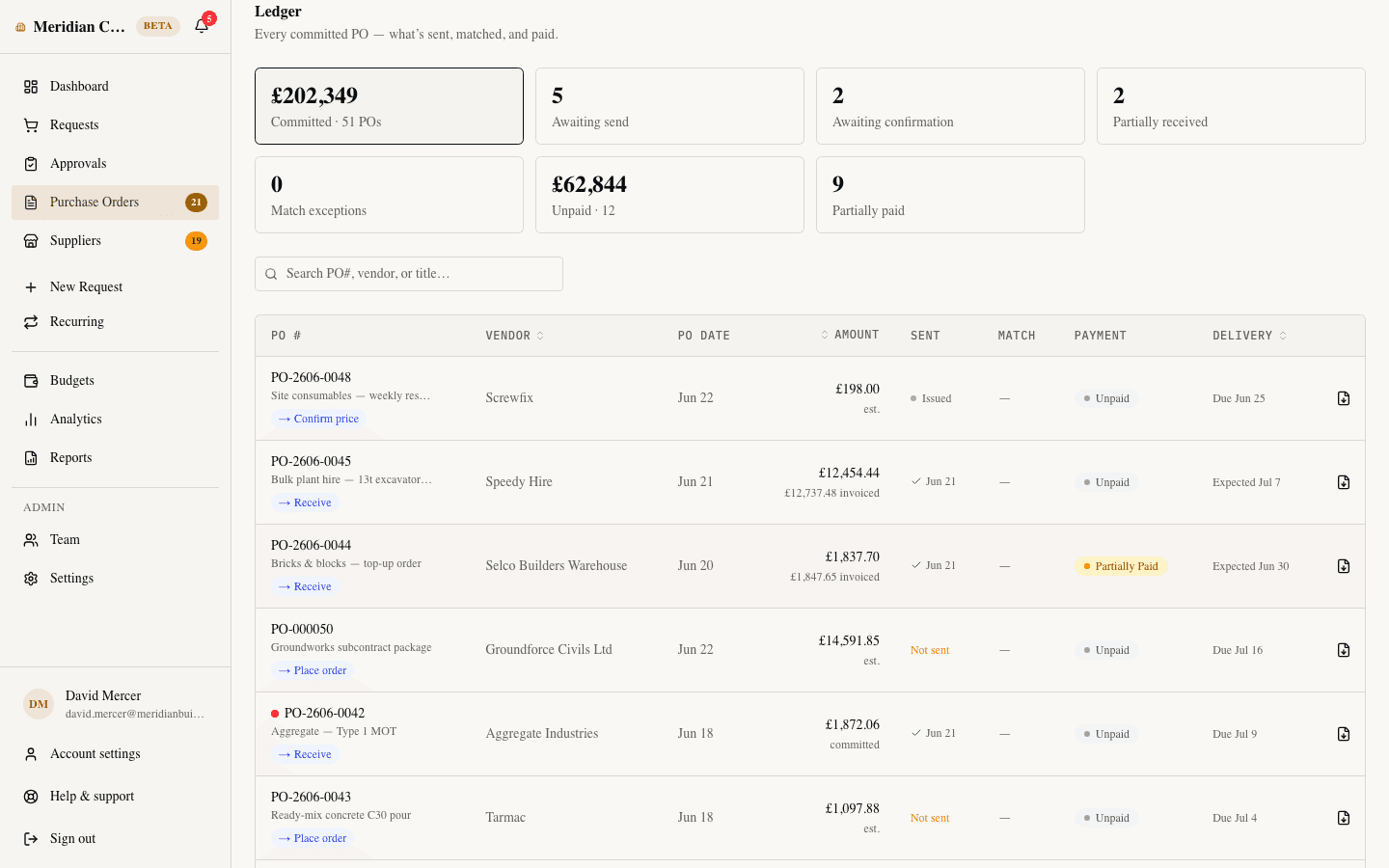
Submit multi-item purchase requests with quantities, suppliers, priorities, and file attachments — no more email chains or shared spreadsheets.
Approve with confidence
Review, approve, reject, or ask for changes — all with one click. Every decision is logged with a comment and timestamp. Assign the right role to every team member.
Budget & spend control
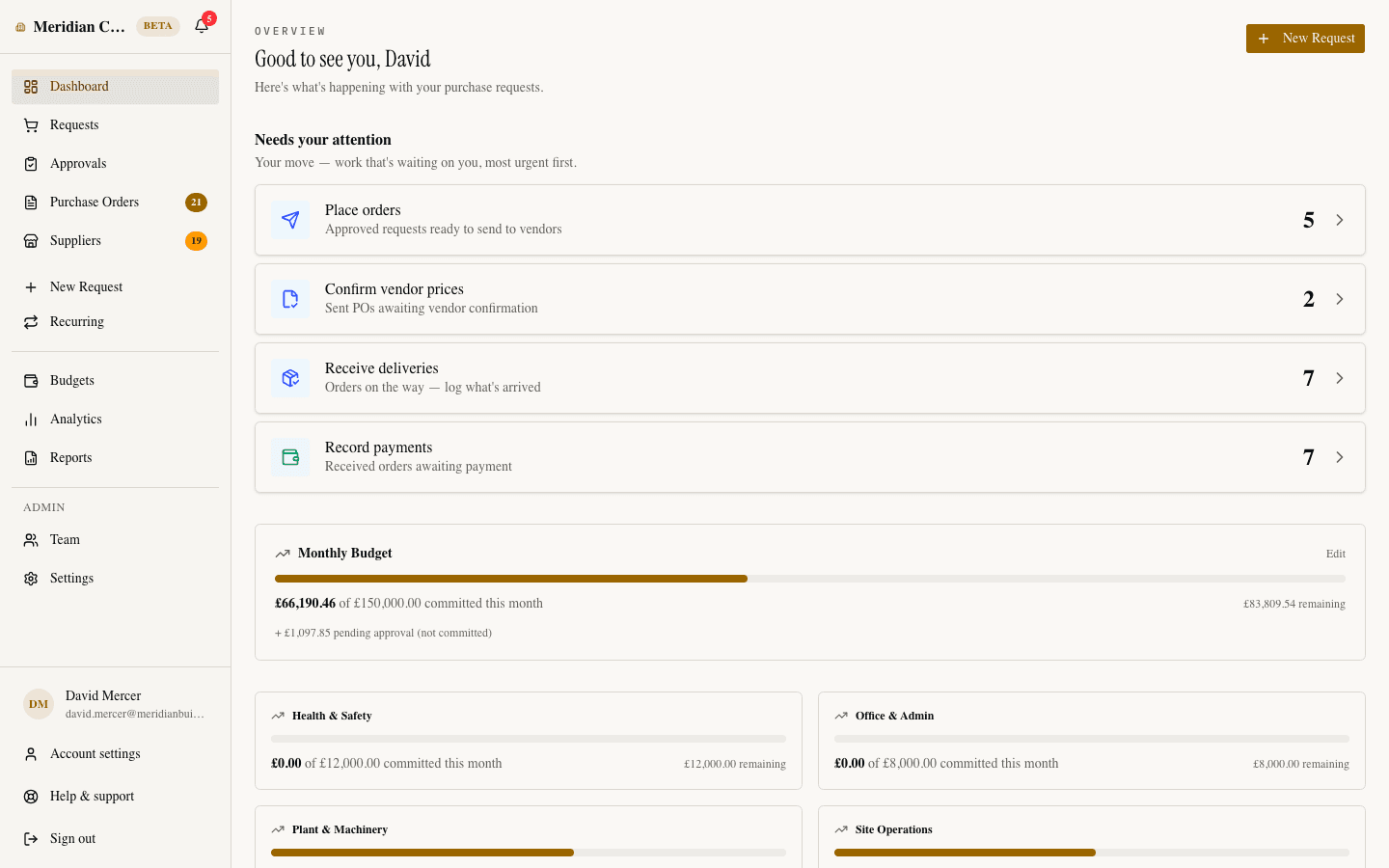
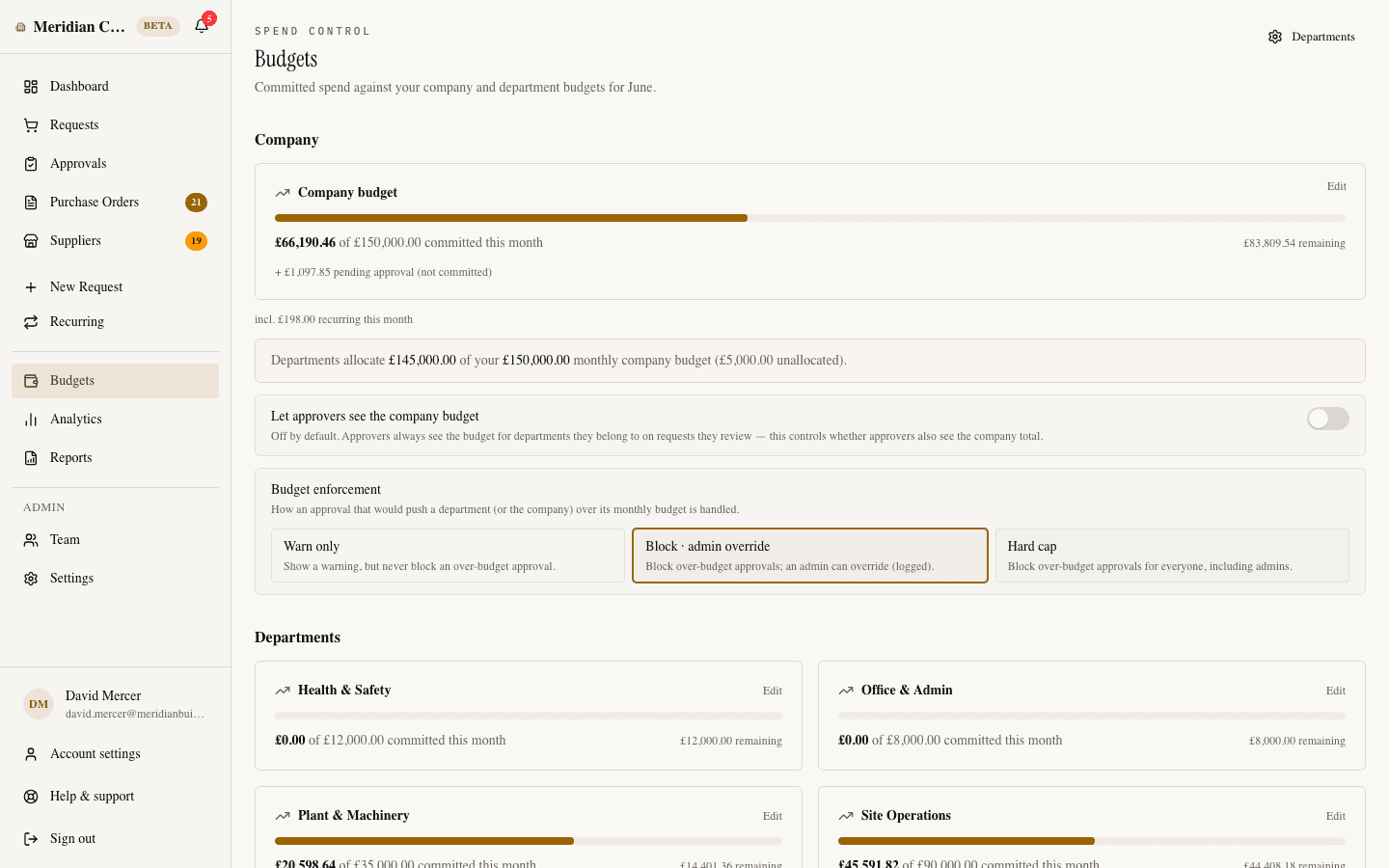
Set monthly spend limits and track committed vs. remaining budget in real time. Get warnings before your team overspends — no surprises at month-end.
Track from request to delivery
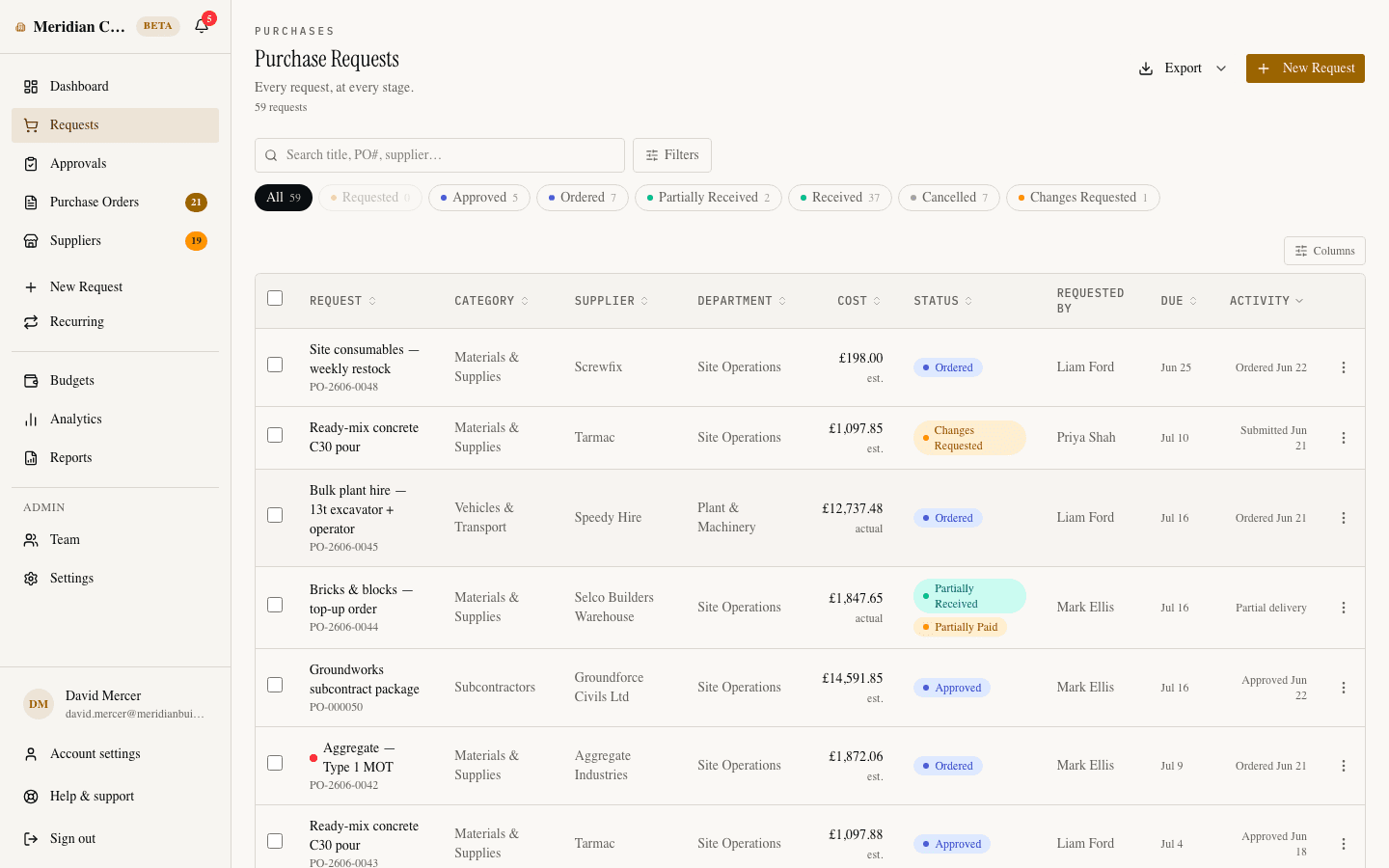
Follow every purchase from approval through ordering to receipt. Log delivery dates, supplier references, actual costs, and upload confirmations — nothing falls through the cracks.
Instant notifications
Approvers are notified the moment a request lands. Requesters hear back as soon as a decision is made.
PDF purchase orders
Generate professional purchase orders as PDFs, ready to send to suppliers. Auto-numbered, with your company name and order details.
Reports & exports
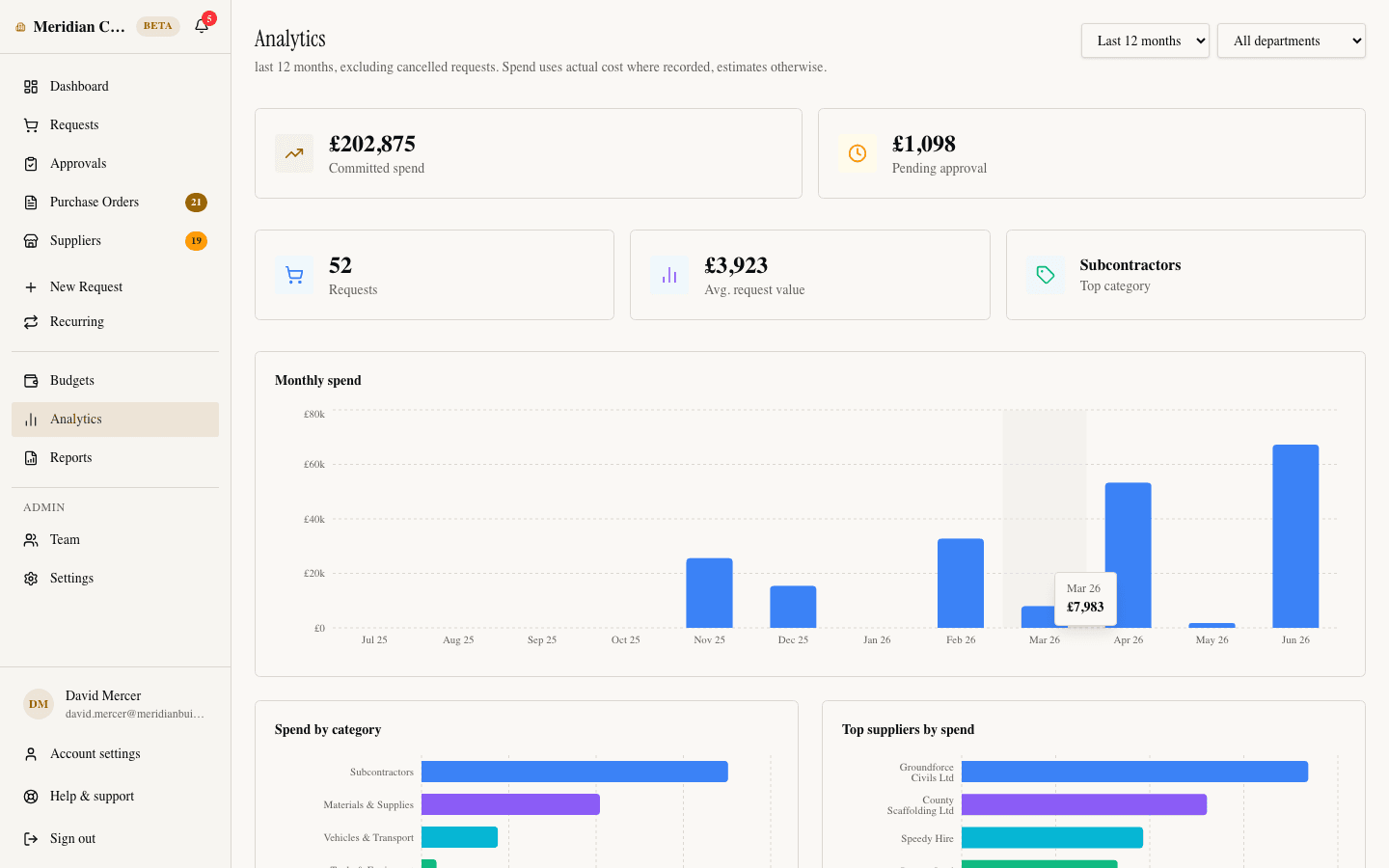
See where your money goes with spend analytics by category, supplier, and month. Export your requests to CSV — filter by status, date, or category.
Works on any device
Fully responsive on desktop, tablet, and mobile. Submit requests from the job site, approve on the go — no app install needed.
Everything included
Requests
- Multi-item requests
- File attachments
- Project & cost codes
- Recurring requests
- Priorities & needed-by dates
Approvals
- One-click approve, reject or request changes
- Threaded comments
- Role-based routing
- Full audit trail
Budgets
- Company & per-department budgets
- Committed vs. remaining, live
- Overspend warnings, blocks or hard caps
- Approver visibility controls
Orders & delivery
- Auto-numbered purchase orders
- PDF POs to send to vendors
- Vendor price confirmation
- Delivery tracking & receipts
- 3-way invoice matching
- Payment recording
Suppliers & insight
- Supplier directory
- Spend analytics by category, supplier & month
- Reports & CSV export
Admin & security
- 4 roles: Admin, Approver, Requester, Viewer
- Team management & invites
- Row-level security & encryption
- Email notifications
How it works
Up and running in minutes
A team member submits a request
They fill in what they need, the supplier, and the estimated cost. Takes less than a minute.
The approver reviews and decides
They get an email notification, review the details, and approve, reject, or ask for changes — with one click.
Everyone stays in the loop
The requester is notified, the PO is ready to download, and your team tracks the purchase through to delivery.
Schedule of fees
Simple, honest pricing
REF: SC-2026-001
Early access — founding customers lock in our launch pricing. Free during the beta, no card required.
Pro
Early accessFree during the beta — no credit card required.
- Your whole team, one flat price — no per-seat fees
- Unlimited purchase requests
- Every feature included — no add-ons or feature gates
- Approval workflow with comments & change requests
- Company & department budget controls
- Full order-to-delivery tracking
- PDF purchase orders, auto-numbered
- 3-way invoice matching
- Spend analytics, reports & CSV export
- Full audit trail & email notifications
- Priority email support
Early
access
Pricing at launch
Compare our pricing model with other purchase order software
Free during the beta. Questions? hello@spendcue.com
A look around
See it in action
Questions
Frequently asked
01.Who is SpendCue for?
SpendCue is built for growing teams that have outgrown managing purchase approvals in email, Slack, or spreadsheets — but don’t want heavy ERP software. If you need a simple way to request, approve, and track purchases, SpendCue is for you.
02.Isn’t a corporate card (Ramp, Brex) enough?
SpendCue isn’t a card or a bank — it’s the approval and PO layer that sits in front of whatever you pay with, whether that’s a company card, bank transfer, or supplier invoice. Spend gets approved before money moves, instead of reconciled after the fact. Many teams run SpendCue alongside their cards.
03.Does SpendCue require an ERP or an IT project?
No. SpendCue is self-serve purchase order software that runs alongside whatever you already use. Setup takes about five minutes: sign up, invite your team, set approval rules and budgets. No implementation project, no consultants, no IT involvement.
04.What’s the difference between a purchase request and a purchase order?
A purchase request is the internal ask — what someone wants to buy, with line items and suppliers, routed for approval. A purchase order is the external commitment — the numbered document sent to the vendor after approval. In SpendCue, approved requests become auto-numbered purchase orders automatically, so nothing is ordered without an approved request behind it.
05.Can I control budgets per department?
Yes. You set monthly budgets for the company and for each department, and SpendCue checks them at the moment of approval — before money is committed. Enforcement is configurable per budget: warn approvers, allow admin-only override, or hard-cap. Admins are alerted when a budget crosses 80% and 100%.
06.Does SpendCue do 3-way invoice matching?
Yes. When goods are received and an invoice is entered, SpendCue reconciles order, receipt, and invoice with the tolerances you set, and flags exceptions before anything is cleared for payment. Invoices are entered manually — there’s no OCR capture or e-invoicing yet — but the matching itself is automatic.
07.Do vendors need to use SpendCue?
No. Vendors don’t need an account or a login — they receive a professional PDF purchase order by email, sent from SpendCue in one click, and they reply or invoice exactly as they do today.
08.Does SpendCue connect to my accounting tools?
Not yet. Today you can export everything to CSV and generate PDF purchase orders to send to suppliers. Direct QuickBooks and Xero sync, plus Slack and Teams approvals, are on the near-term roadmap — join the beta and you’ll help shape what ships first.
09.How does the free beta work?
Join the waitlist and we’ll invite you when your spot is ready. During the beta you get full access to every feature, free, with no credit card — the 30-day trial clock only starts at public launch. Founding customers lock in the launch rate before any charges begin, and your data is never deleted.
10.What does Pro include?
Pro is one flat monthly plan sized to your team — no per-seat fees, and every feature included: unlimited requests, the full approval workflow, company and department budgets, order-to-delivery tracking, PDF purchase orders, 3-way invoice matching, spend analytics, and priority email support. It’s free during the early-access beta; we’ll announce launch pricing before any charges begin, and founding customers lock in our launch rate.
11.What happens when my trial ends?
Your data stays safe and accessible — nothing is deleted. Your workspace becomes read-only, so you can still view everything. Upgrade to Pro to create new requests and pick up where you left off.
12.Is my data secure?
Your data is completely isolated from other companies using row-level security. All data is encrypted at rest and in transit. We never share your data with third parties.
13.Do I need to install anything?
No. SpendCue is a web app — it works in any modern browser on desktop or mobile. No downloads, no plugins, no IT department required.
Start managing purchases properly.
Get 30 days free during beta. Full access, direct support from the founder, and never lose track of a purchase request again.
Join waitlist30 days free · No credit card · No commitment