Feature
Spend reports, straight from your purchase orders
Every request, approval, order, and payment in SpendCue feeds one clean dataset. So when someone asks where the money went this quarter, the answer is a report you open — not a spreadsheet you spend Friday building.
How it works
From purchase data to answers
The data collects itself
Every purchase is recorded as your team works — who requested it, who approved it, when it was ordered, received, and paid. Nothing is entered twice, and there’s no export-and-clean ritual.
Open a report, not a blank sheet
A curated library of built-in reports covers the questions that actually come up: spend by vendor, category, and department, monthly trend, budget vs actual, open PO aging, payables, and a step-by-step PO lifecycle report.
Filter to the question
Set the time window — from the last three months to the last two years, or year-to-date — and narrow to a department. Each report shows a chart, summary figures, and the full table behind them.
Export it in one click
Every report exports to CSV, Excel, or PDF with the same numbers in each format — ready for your accountant, your board deck, or a deeper dive.
Capabilities
Reports that answer real questions
Spend by vendor, category, and department
See supplier concentration and tail spend, which categories drive cost, and how departments compare — each ranked, charted, and exportable.
Budget vs actual, with variance
Committed spend against company and department budgets, with variance and over-budget flags. Committed means real numbers: once an actual cost is recorded, it replaces the estimate.
The full PO lifecycle, order by order
One row per purchase order: who approved, ordered, received, and paid it, and how many days each stage took — plus average approval time and lead time across the lot.
Aging for open orders and unpaid bills
Open POs bucketed by how overdue they are against their needed-by dates, and unpaid or part-paid orders on a current, 30, 60, and 90+ day schedule.
CSV, Excel, and PDF — same numbers everywhere
Every report exports in all three formats from one dataset, and the request and purchase order ledgers export the same way — the file you send matches the screen you saw.
A dashboard for the big picture
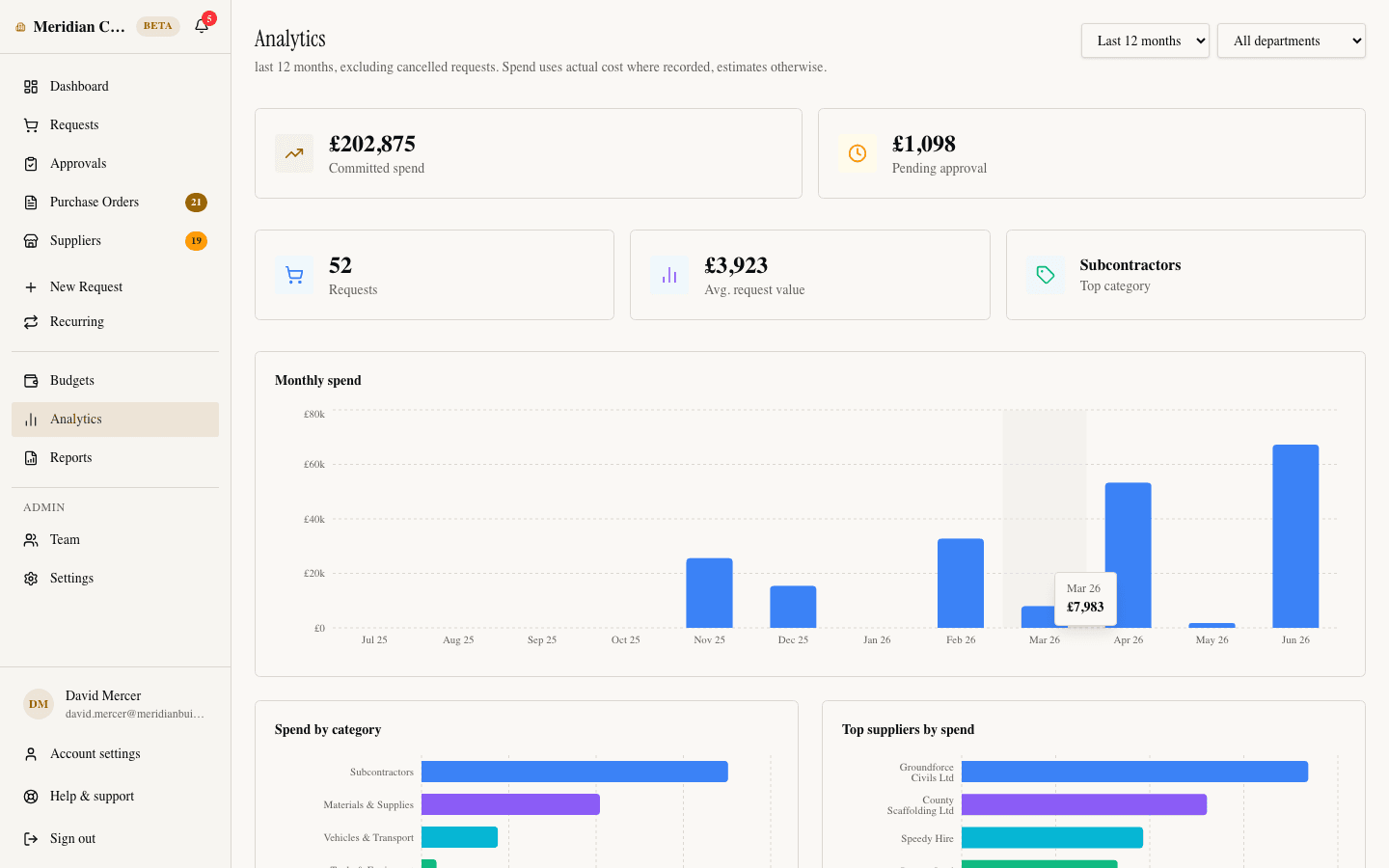
Committed versus pending spend, request count and average value, and your top category — with charts of monthly spend, categories, top suppliers, and departments.
Reporting is included in the flat price
Every report, every export format, every user — no analytics add-on, no per-seat fees.
FAQ
Reporting questions, answered
What reports are included?
A curated library of core reports: spend by vendor, by category, and by department, monthly spend trend, tax summary, budget vs actual, open PO aging, a step-by-step PO lifecycle report, and unpaid payables. Each one has a chart, summary figures, and export built in.
Can I export reports to Excel?
Yes. Every report exports to CSV, Excel (XLSX), and PDF in one click, and the request and purchase order ledgers export the same way. All three formats come from the same dataset, so the numbers always match.
Who can see reports?
Admins and viewers always can, and approvers can when the company setting for it is on — it is by default. The viewer role exists exactly for this: give finance or leadership read-only access to reports and analytics without letting them touch a single purchase.
Do I have to set anything up first?
No. Reports are built from the purchase data your team creates just by using SpendCue — there are no connectors to configure, no data warehouse, and no report-building project. The first request you approve is the first row in your reports.
Can reports be emailed to me on a schedule?
Not yet — scheduled report delivery is on our roadmap. Today the flow is: open the report, set the time window, and export it in one click. Most teams pull what they need for a monthly close in a couple of minutes.
Know where the money goes
Join the waitlist and get spend visibility from the first purchase — no spreadsheet required.
Join the waitlistNo credit card · Set up in minutes