No ERP required
Purchase order software — without the ERP
Most purchase order software lives inside an ERP: buy the suite, scope the implementation, hire the consultants, then wait. If what you actually need is purchase requests, approvals, purchase orders, and budgets that are enforced, that’s a lot of project for a workflow. SpendCue is that workflow on its own — self-serve, about five minutes to set up, one flat monthly price sized to your team.
The short version
An ERP earns its keep when you need the whole stack — general ledger, inventory, payroll, manufacturing — in one system. Purchasing control comes with it, but so do the implementation project, the per-module pricing, and the IT owner. If you’re already committed to an ERP for those reasons, its purchasing module is probably the right call.
SpendCue is for teams that need purchasing under control now — requests, approvals, purchase orders, budgets, receiving, and invoice matching — while keeping the accounting tool they already have. You sign up, invite the team, set approval rules, and send your first PO the same morning.
The contrast
An ERP project vs signing up
This isn’t a feature race — an ERP does far more than SpendCue ever will. It’s a scope question: what does it take to get controlled purchasing, and what do you carry along with it.
| Getting PO control | SpendCue | The ERP route |
|---|---|---|
| Time to first PO | About 5 minutes of setup — sign up, invite the team, set approval rules, send | An implementation project — requirements, configuration, migration, training — measured in weeks or months |
| What it costs | One flat monthly price sized to your team — every feature included, cancel anytime | License plus implementation — typically quoted per module, per user, or both, with consultants on top |
| Who runs it | Whoever owns purchasing — no IT project, nothing to host or maintain | IT or a systems partner — an ERP is infrastructure, and it’s owned like infrastructure |
| What you get | The purchase workflow: requests, approvals, POs, budgets, receiving, 3-way matching, reports | Everything — general ledger, inventory, payroll, manufacturing — whether or not you need it yet |
| What happens to your accounting | Keep it — SpendCue runs alongside; exports today, integrations on the roadmap | It moves in — the ERP becomes your general ledger, which is the point, and the project |
What you get
The full purchase workflow, no modules
Purchase requests
A clear form with line items, suppliers, and attachments — with budget warnings before anyone submits.
Approval workflows
Multi-step chains routed by amount, category, and department, with an auto-approve threshold and a full audit trail.
Purchase orders
Approved requests become numbered POs automatically — vendor-ready PDFs, emailed in one click.
Budgets that act
Monthly company and department budgets checked on every approval — warn, block, or hard cap.
Receiving & 3-way matching
Log what arrives, enter the invoice, and SpendCue reconciles order, receipt, and invoice with tolerances before anything is cleared to pay.
Reports & exports
A curated library of purchase reports — spend by vendor, category, and department, budget vs actual — exportable to CSV, Excel, or PDF.
Honesty
What SpendCue deliberately isn’t
Choosing a tool that doesn’t do everything only works if the vendor is clear about what it doesn’t do. So:
Not your general ledger
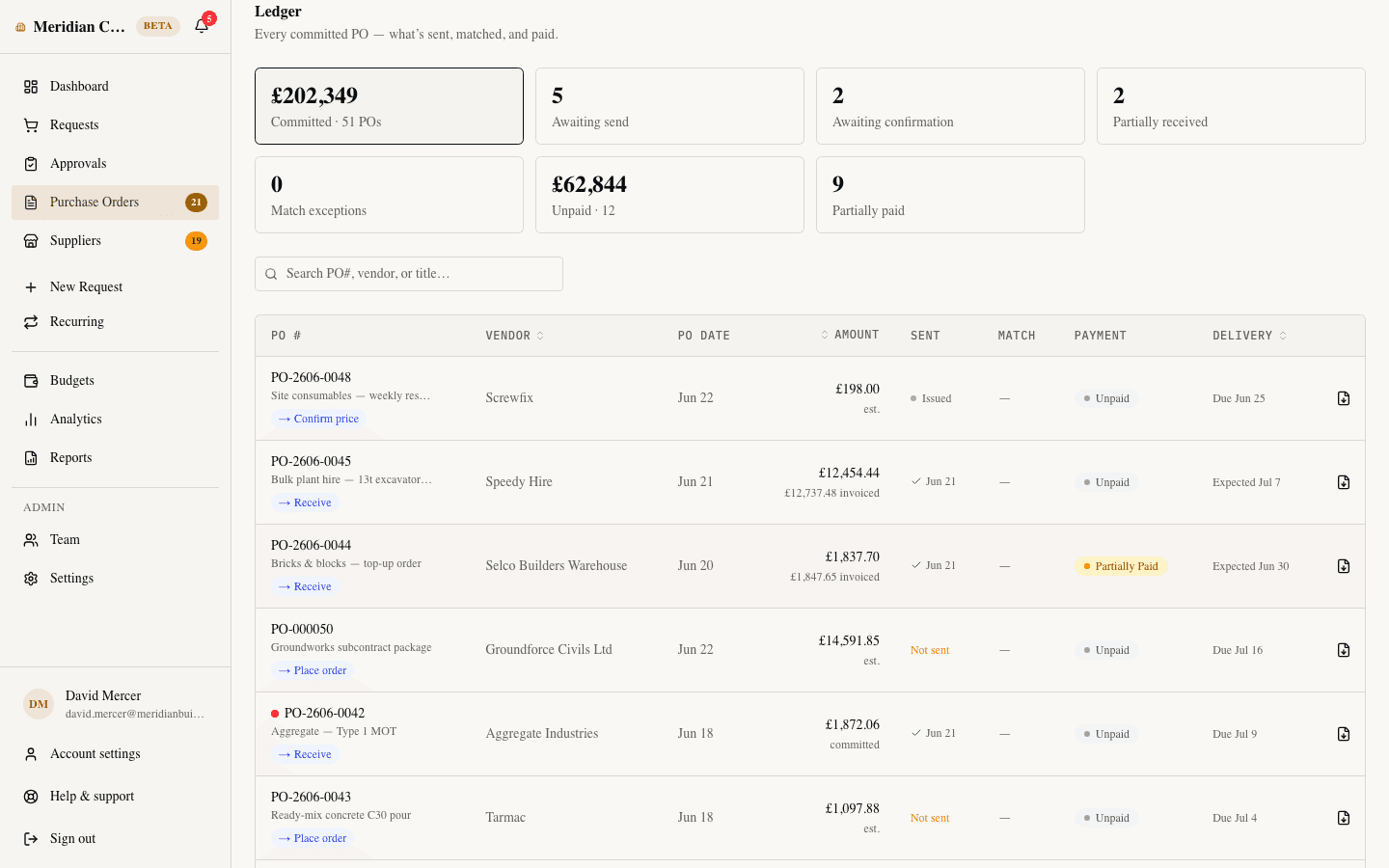
SpendCue’s Ledger screen tracks committed POs — what’s sent, matched, and paid. Your books — chart of accounts, journal entries — stay in your accounting tool.
Not inventory or manufacturing
No stock levels, no MRP, no warehouse management. SpendCue tracks what was ordered and received against POs, not what’s on the shelf.
No accounting sync yet
QuickBooks and Xero integrations are on our roadmap, not shipped. Today the handoff is exports — CSV or Excel your bookkeeper can import.
Not an ERP replacement
If your business genuinely needs an ERP, get the ERP — and use its purchasing module. SpendCue is for teams that aren’t there yet and don’t want the project.
One flat price — no modules, no project
Every feature at every size — no per-user fees, no implementation quote, 30 days free without a credit card.
FAQ
PO software without an ERP, asked directly
Do I need an ERP to use purchase orders properly?
No. A purchase order is a workflow and a document, not an accounting system: a request is approved, a numbered PO goes to the vendor, and the delivery and invoice are checked against it. SpendCue runs that whole loop — requests, approvals, PO PDFs, receiving, 3-way matching — alongside whatever accounting tool you already use.
How does SpendCue work with my accounting software?
Side by side, honestly: there’s no native sync yet — QuickBooks and Xero integrations are on our roadmap. Every report and the PO Ledger in SpendCue export to CSV or Excel, which is how teams hand purchase data to their bookkeeper today. If a live sync is a hard requirement right now, we’re not the right tool yet — we’d rather tell you that here.
Can SpendCue replace our ERP?
No — and we won’t pretend otherwise. SpendCue does the purchasing workflow only: no general ledger, no inventory, no payroll. If you have an ERP for those reasons, its purchasing module is probably the right call. SpendCue is for teams that don’t have one and don’t want an implementation project just to control purchasing.
How long does setup actually take?
About five minutes to something usable: sign up, invite your team, set approval rules and budgets. No sales call, no scoping workshop, no consultants. The 30-day trial doesn’t ask for a credit card, so trying it costs nothing but the five minutes.
What does it cost?
One flat monthly price sized to your team — every feature included, no per-user fees, no minimums, and no implementation fee. Founding customers lock their rate at launch. The details are on our pricing page.
Purchasing under control by lunch
Join the waitlist — requests, approvals, purchase orders, and budgets without an ERP project.
Join the waitlistNo credit card · Set up in minutes