Feature
Create and track purchase orders online
In most growing teams, purchase orders live in a Word template and a numbering spreadsheet — disconnected from who approved them and whether they ever arrived. In SpendCue, every purchase order starts as an approved request, gets its number automatically, goes to the vendor as a PDF, and stays tracked until it’s received and paid.
How it works
From approved request to closed order
Approval creates the purchase order
The moment a request clears its approval chain, it becomes a purchase order with the next number in your sequence. No copy-pasting into a template, no numbering spreadsheet to maintain.
Send it to the vendor
One click renders a vendor-ready PDF — your company details, payment and shipping terms, and line items — and emails it to the supplier. Every send is logged: when, and to whom.
Record the vendor’s confirmation
Log the vendor’s acknowledgement line by line, including the price they actually confirmed. If the agreed total runs over what was approved, the order is held for re-approval before the price locks.
Track it to received and paid
Mark orders as received and paid, note expected delivery dates, and flag problems like backorders or delays. The full history — approval, sends, confirmation, receipt — stays on the order.
Capabilities
Everything a purchase order needs
Automatic PO numbering
Every order gets the next number in a continuous, company-wide sequence the moment it’s approved. No duplicates, no gaps to explain at audit time — and every PO is searchable by its number.
A vendor-ready PDF
A clean, professional document with your billing details, tax ID, payment and shipping terms, and itemized lines — generated in your company’s language, ready to download or send.
Email straight to the supplier
Send the PO to the supplier’s address on file, or type a different one. Replies go to your purchasing contact, and each send is recorded on the order.
Price changes go back for approval
When a vendor confirms at a higher price than was approved, the order doesn’t quietly proceed — it’s held for a fresh approval, and whoever entered the increase can’t sign it off themselves.
Recurring orders
Reorder a past purchase in one click, or put repeat purchases on a schedule — SpendCue creates the request when it’s due and routes it through your normal approvals.
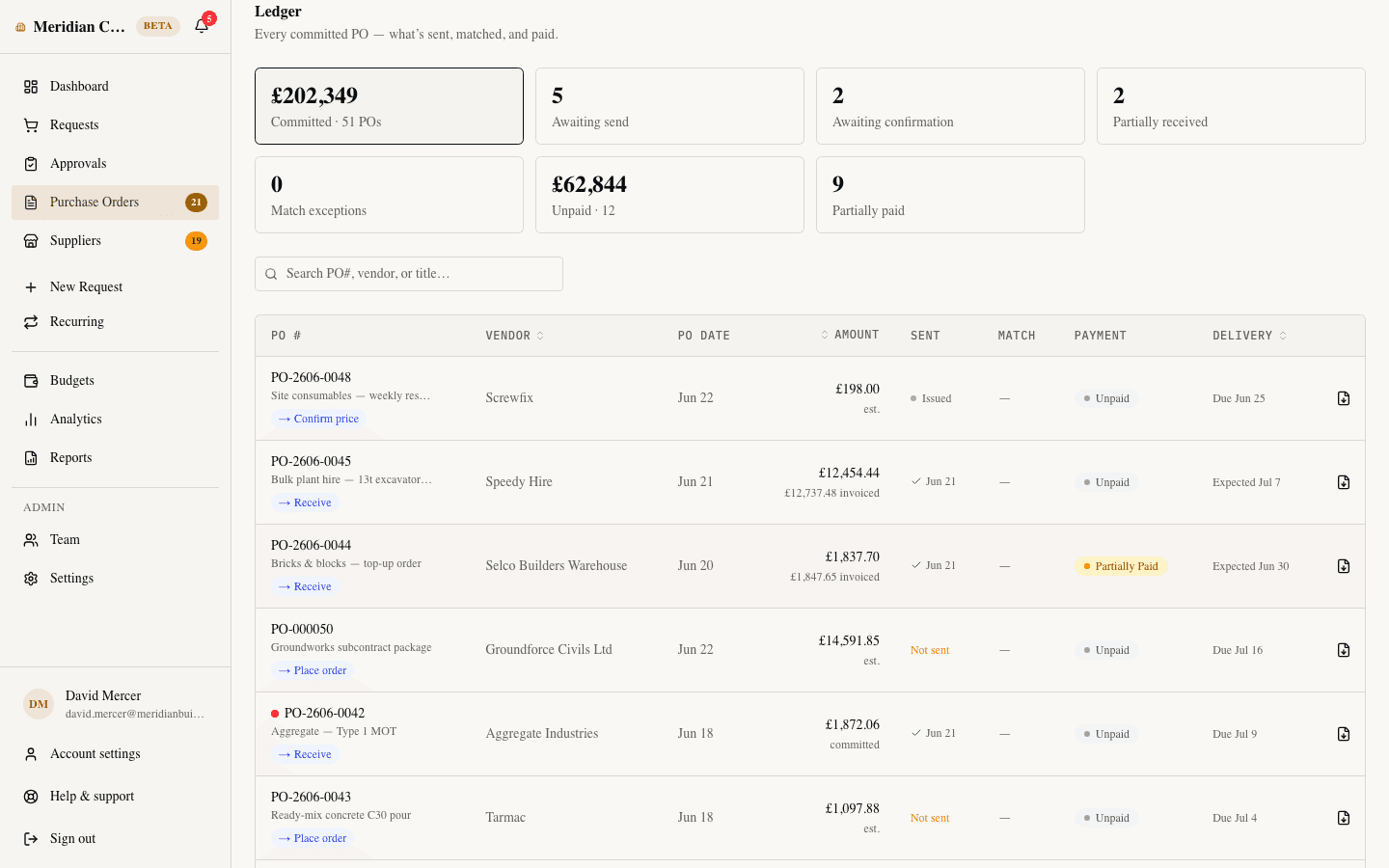
One view of every order
A dedicated purchase orders view shows status, supplier, amount, and delivery for every open PO — searchable by number or supplier, and exportable to CSV or Excel.
Purchase orders are included — like everything else.
SpendCue is one flat monthly price for your whole company. PO numbering, vendor PDFs, email sends, and order tracking are part of the product, not add-ons. Setup takes minutes — there is no ERP project.
FAQ
Questions about purchase orders
How are purchase order numbers assigned?
Automatically. Each company has one continuous sequence, and a request gets the next number the moment it’s approved. Numbers can’t be reused or skipped, so your audit trail stays clean.
Can I send the purchase order to the vendor from SpendCue?
Yes. One click emails the PO as a PDF to the supplier’s address on file — or an address you type — with replies going to your purchasing contact. You can also download the PDF and send it however you like.
What happens if the vendor confirms a different price?
You record the confirmed prices line by line. If the agreed total stays within what was approved, the order is confirmed. If it runs over, the order is held for re-approval before the new price locks — and the person who entered the increase can’t approve it themselves.
Does SpendCue handle recurring purchases?
Yes. You can reorder any past purchase in one click, or set up a recurring order on a schedule — weekly, monthly, whatever the cadence. SpendCue creates the request when it’s due and it flows through your normal approval chain.
Do I need an ERP or accounting integration to create purchase orders?
No. SpendCue runs on its own — you can be creating numbered, vendor-ready purchase orders minutes after signing up. Orders and reports export to CSV and Excel, and accounting integrations are on our roadmap.
Retire the PO spreadsheet
Numbered, vendor-ready purchase orders from day one — no templates, no ERP project.
Join the waitlistNo credit card · Set up in minutes