Feature
Department budget tracking, built into approvals
Most teams find out a budget was blown when the month closes — after the money is spent. SpendCue tracks every purchase against monthly company and department budgets as it happens, shows approvers the impact before they say yes, and — if you want — blocks approvals that would go over.
How it works
Set it once, checked on every approval
Set monthly budgets
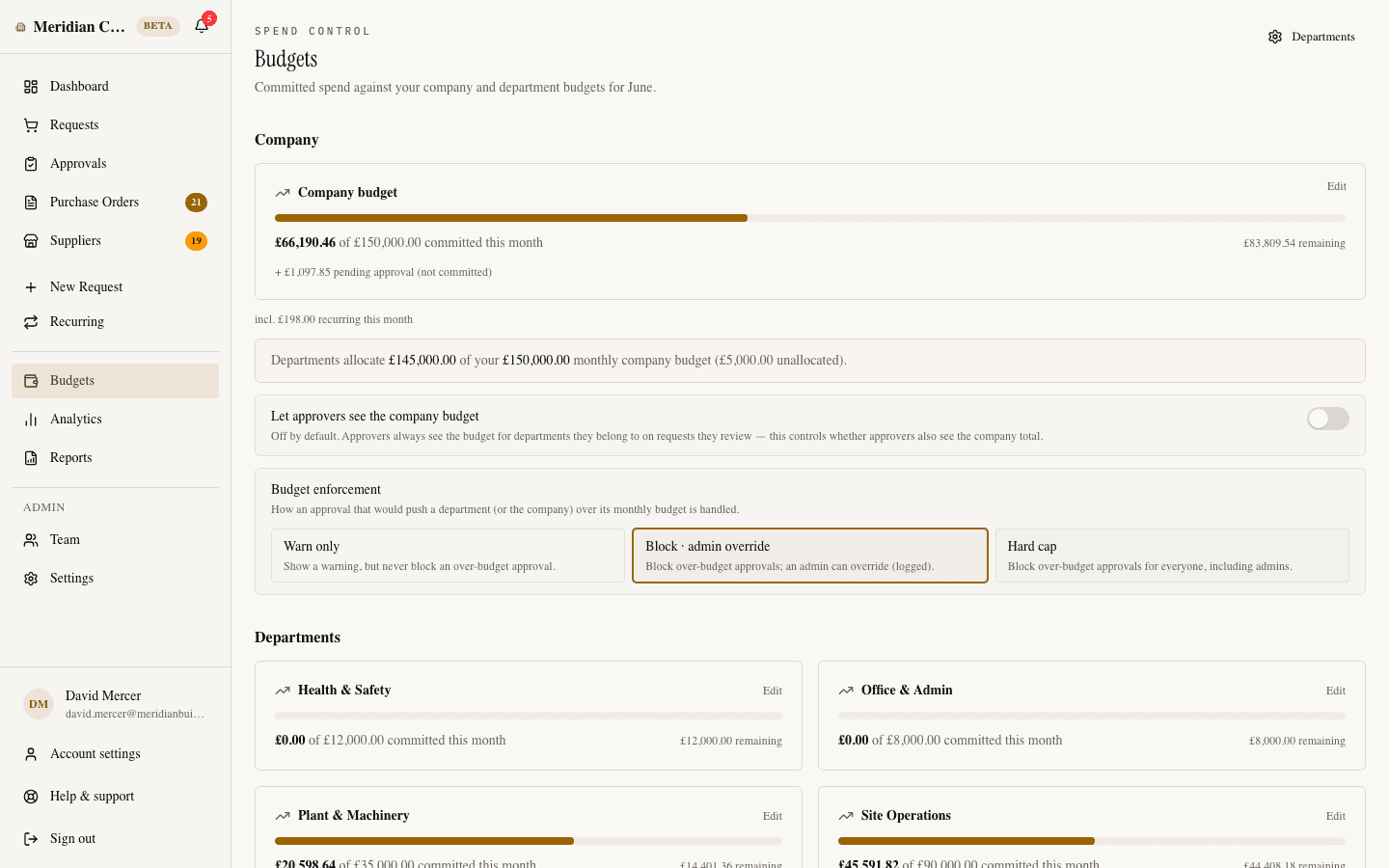
Give the company an overall monthly cap and each department its own allocation, in your currency. A purchase charged to a department counts against both — the department’s budget and the company total.
Spend is counted as it happens
The moment a request is fully approved, its cost lands in the month’s committed spend. Pending requests are shown separately, and once a vendor confirms a price, the budget uses the real number — not the estimate.
Approvers see the impact before they decide
The request itself shows what approving it would do to the budget — how much of the month is already used, and whether this purchase takes the department near or over the line.
Over-budget approvals, handled your way
Choose what happens when an approval would go over budget: warn and allow it, block it so only an admin can override — with the override logged — or block it outright. A budget here is a control, not a report.
Capabilities
Everything budget control needs
Company and department budgets
One overall monthly cap for the company, plus per-department allocations within it. See at a glance how much of the company budget is allocated — and which departments have no budget set yet.
Enforcement you choose
Three modes: warn only, block with admin override, or a hard cap nobody can pass. Every override is logged in the audit trail, so an exception is a decision — not a leak.
Auto-approval respects the budget
Small purchases under your auto-approve threshold normally skip review — but if one would push a budget over, it falls back to human review instead of slipping through.
Alerts at 80% and 100%
The approval that takes a department — or the company — past 80% or 100% of its monthly budget alerts every admin, in the app and by email. Once per threshold, not a daily nag.
Committed, pending, and recurring — kept honest
Budgets count what’s actually approved, show pending requests separately, and break out how much of the month’s spend comes from recurring standing orders.
One budgets screen
Every budget for the month on one page: the company total, each department, spend against each, and how much of the cap is allocated. Admins always have it; approvers can be given access too.
Budget control is included — like everything else.
SpendCue is one flat monthly price for your whole company. Department budgets, enforcement, and alerts are part of the product, not an add-on tier. Setup takes minutes — there is no ERP project.
FAQ
Questions about budget control
Can SpendCue block purchases that go over budget?
Yes — if you want it to. Each company picks an enforcement mode: warn only, block with admin override, or a hard cap nobody can pass. In override mode, an admin pushing an approval through is recorded in the audit trail.
Do budgets reset every month?
Yes. Budgets are monthly: committed spend is counted within the calendar month, and a new month starts the count from zero. Set the amounts once and they carry forward until you change them.
What counts against the budget?
Approved spend. A request’s cost lands in committed spend the moment it’s fully approved, using the most accurate number available — the final actual cost, the vendor-confirmed price, or the estimate. Pending requests are shown alongside, but don’t count as committed.
Who can see budget figures?
Admins always see the full picture, including the budgets screen. Approvers see budget warnings on the requests they review, and you decide whether they can also see company-wide figures and the budgets screen.
What about purchases that are auto-approved?
The auto-approve threshold never bypasses budget control. If a small purchase would push its department or the company over budget, it isn’t silently approved — it’s routed to a person to decide (unless you’ve set budgets to warn-only).
Know before the money is spent
Budgets your approvers actually see — and your approvals actually enforce. Live from day one, no ERP project.
Join the waitlistNo credit card · Set up in minutes